
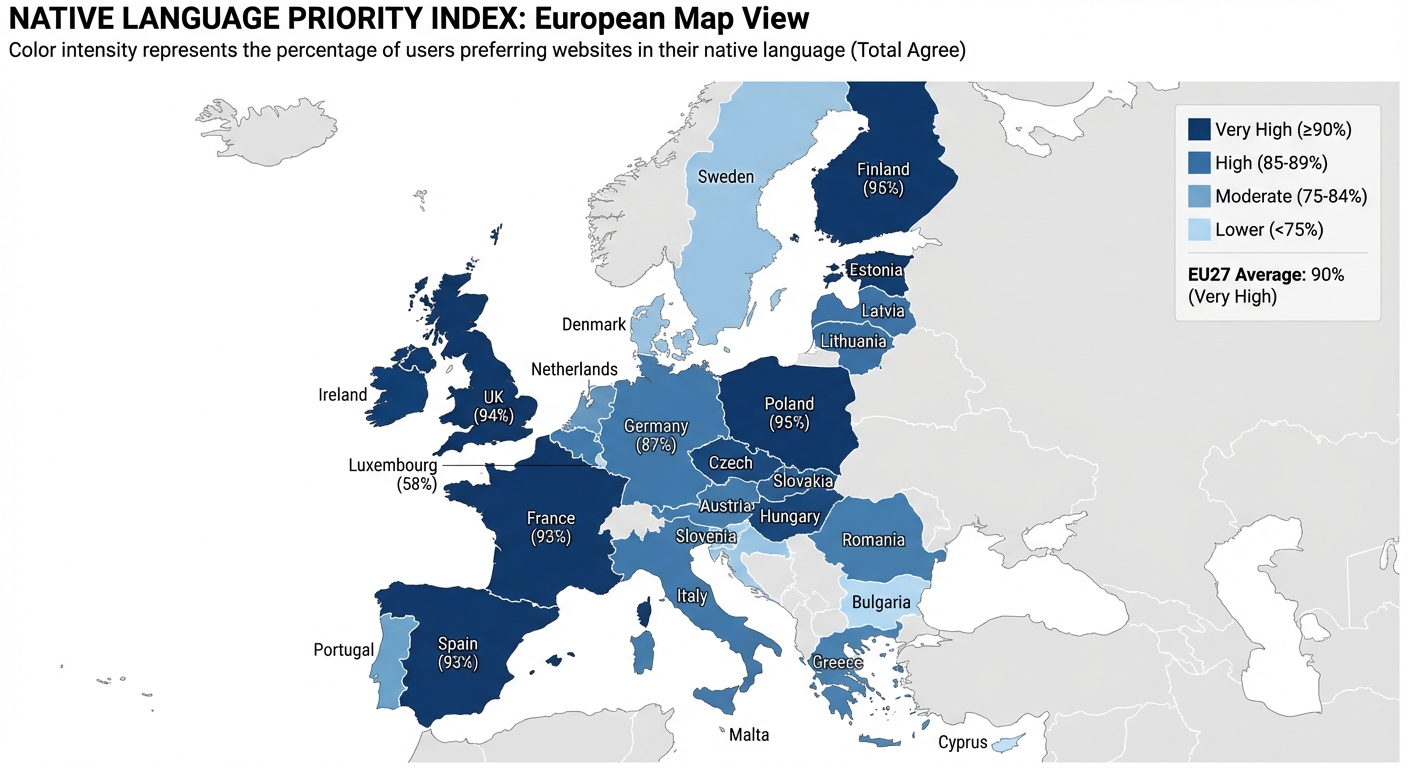
The European Commission’s 2011 Eurobarometer survey of 13,752 internet users found that 90% prefer websites in their own language, and only 18% will buy products in a foreign language. While a 2024 follow-up shows English proficiency has grown (especially in Spain, Portugal, and Eastern Europe), native language preference remains the dominant pattern. The business case for localization is settled.
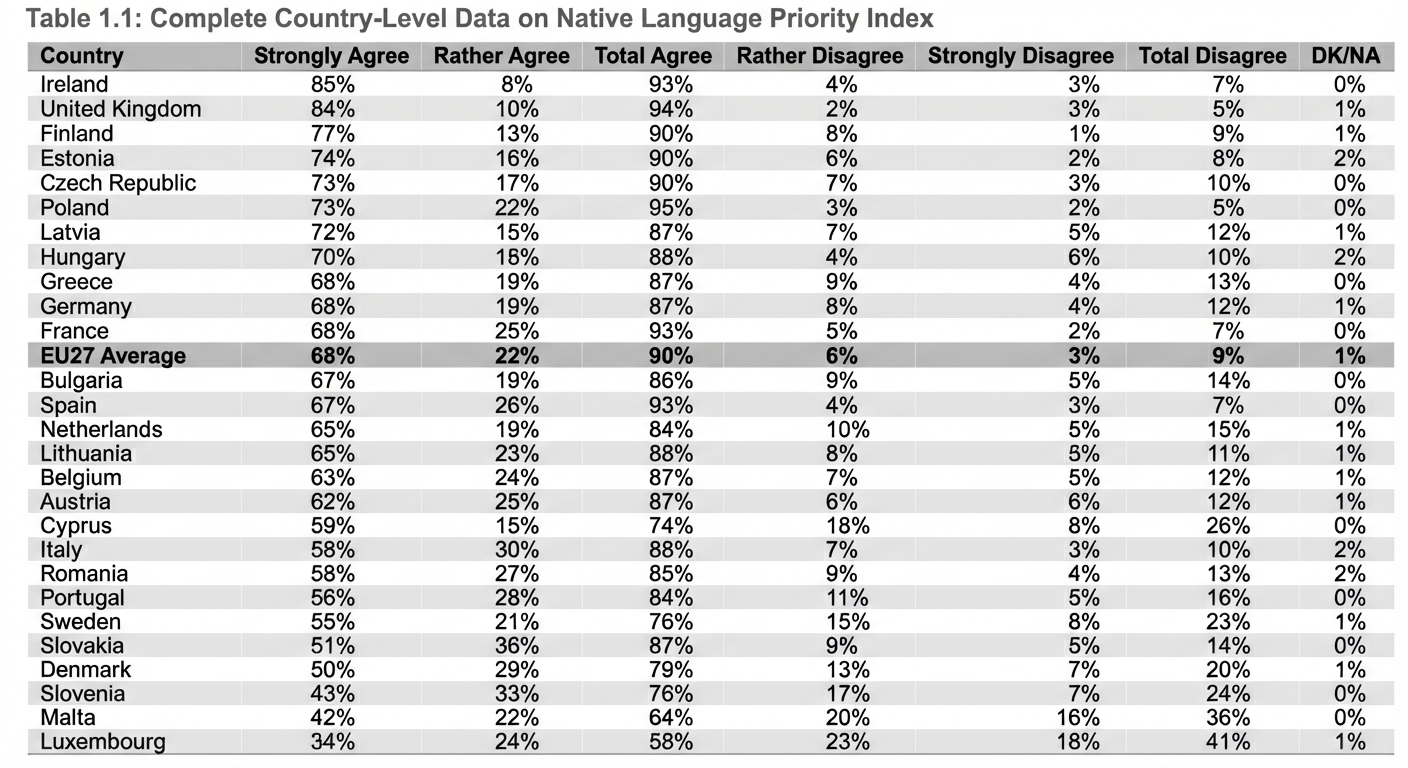
The harder question: how do you scale it? A spreadsheet with English in column A and Spanish in column B works at 50 strings. At 5,000 strings across 12 languages, that same approach becomes a liability.

When Manual Translation Management Falls Apart
Manual File Sync Hell
The manual workflow looks like this:
- Developer exports translation files from the codebase
- Developer emails files to translator (or uploads to shared drive)
- Translator downloads, opens in Excel, translates
- Translator emails back (or re-uploads)
- Developer downloads, checks for issues, merges into codebase
- Repeat for every language, every sprint
This cycle is fragile. Files get lost in email threads. Someone forgets to download the latest version. A merge conflict destroys an afternoon of work. One misplaced comma in a JSON file breaks the entire build.
Every hour spent on manual file management is an hour not spent building features.
Version Control Chaos
While your translators work on version 1.2 of your strings, your developers shipped version 1.3 and are already working on 1.4. By the time translations come back, they’re based on outdated source text.

This creates cascading problems:
- Missing strings: New text added after export never gets translated
- Orphaned translations: Deleted strings still exist in translation files, bloating your bundle
- Incorrect context: String meaning changed, but translation reflects the old version
- Merge nightmares: Multiple translators working on different versions create conflicts
Untranslated strings are the most common localization bug in production. Hard-coded strings are invisible to localization tools, resulting in mixed-language experiences that erode user trust.
Text expansion makes this worse. German expands 35% compared to English. “Settings” (8 characters) becomes “Einstellungen” (13 characters), enough to break a 100px button. Finnish expands 30-40%. Spanish and French expand 20-25%. These aren’t edge cases; they’re every release.
No Single Source of Truth
Where do your translations live? If your answer includes multiple of these, you have a problem:
- JSON files in the repo
- Excel spreadsheets on Google Drive
- Email attachments
- Slack messages from translators
- That one Notion page from 2023
- Someone’s local machine
Six months later, you discover the “current” German file on Google Drive is 400 strings behind the repo version. The translator has been working from an outdated source for months. Reconciling the differences takes days.
No Way to Iterate
Great translations evolve. You learn that “Submit” sounds too formal in German casual contexts. A native speaker spots an awkward phrasing. But without proper tooling, improving translations is nearly impossible:
- No discussion threads: Where do you leave feedback for translators?
- No version history: What did this string say before? Why was it changed?
- No comparison view: How can translators see the previous version alongside the new one?
- No review workflow: How do you approve changes before they go live?
You’re locked into “translate once and hope for the best” because your tools don’t support anything better.

What a Translation Management System Provides
A TMS centralizes your localization workflow: developers push source strings automatically, translators work in a dedicated interface, changes sync back to your codebase. No spreadsheets, no email, no lost files.
The ROI is concrete. The EU’s 2011 Eurobarometer survey found that 44% of internet users feel they miss interesting information because websites aren’t in their language, and only 18% will purchase products in a foreign language. These numbers likely understate current expectations: the 2024 survey shows younger users (15-24) are even more multilingual, raising the bar for what “properly localized” means. Industry standard: 100% translation memory matches are charged at ~30% of the new word rate, and companies typically find 40-60% of content matches existing translations.
| Capability | Spreadsheet | TMS |
|---|---|---|
| Track who made changes | - | ✓ |
| View previous versions | - | ✓ |
| Roll back mistakes | - | ✓ |
| Side-by-side comparison | - | ✓ |
| Blame/audit trail | - | ✓ |

Signs You’ve Outgrown Manual Management
- You’ve lost track of which spreadsheet is current
- Translations regularly ship with missing strings
- Developers spend hours on translation file management
- You’ve paid to translate the same strings twice
- You can’t answer “what percentage of our app is translated?”
- Translation quality varies wildly between languages
If two or more apply, you’ve outgrown manual management.
Managing translations in spreadsheets is like managing code in Word documents: it works until it doesn’t. A TMS gives you one source of truth, full version history, and the automation to scale.
Try the workflow this article describes
Connect a repo, invite a translator, export your files back. Free plan, no card.